Doki Doki Dialogue Generator

Same editor as the home page. This page is about the two-character side of it: two club members in one scene, with the name box deciding who is talking.

1 / 3 lines

— END OF SCROLL —

Two characters in one image

A dialogue needs two people in frame. Open the Character tab, tap “Add character”, and the scene holds two of them — one on the left, one on the right, switchable with the L / R buttons.

Two is the limit here. The desktop tools go up to nine positions, but on a phone anything past two makes both characters too small to read at story size, and the controls stop fitting on screen.

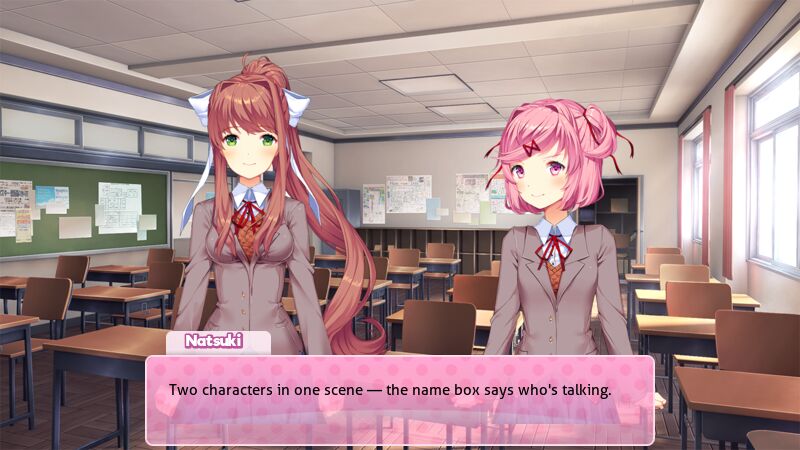
DDLC dialogue scene with Monika and Natsuki side by side in the clubroom, the name box showing Natsuki is speaking
Two characters in one image. The name box is what marks who is talking.

The name box says who is speaking

Both characters stay in frame the whole time. What changes is the name above the text box — that is the entire mechanism for showing who has the line, and it is how the game does it too.

So a back-and-forth is: type the first character's line with their name, export, then swap the name and the line to the other one and export again. Same scene, two images.

Faces do the reacting

The character who is not speaking still carries half the joke. Set the speaker to whatever the line needs, then give the other one the reaction — surprised, unimpressed, looking away.

Each character keeps their own expression and pose, so you can set one and then edit the other without touching the first.

Why this one

Built for phones

Every control is thumb-sized. No desktop needed, no pinch-zooming.

Story & wide export

9:16 for TikTok and IG stories, 16:9 for everywhere else.

Every character

Monika, Sayori, Natsuki and Yuri, with all their expressions and poses.

FAQ

Is it a dialog or dialogue generator?

Both spellings mean the same tool. The site is dokidokidialog.org, but a “dialogue box generator” search lands here too.

How many characters fit in one scene?

Two, placed left and right. That is a deliberate limit for phone screens — more than two and neither of them is readable at story size.

How do I show who is talking?

Change the name in the NAME field. Both characters stay in the image; the name box above the dialogue is what marks the speaker.

Can I make a longer conversation?

Export one image per line and post them as a set. There is no built-in multi-image mode — the scene simply stays loaded between exports, so you only change the name, the line and the expression each time.

Is this the official DDLC tool?

No. This is a free fan-made tool with no affiliation to Team Salvato. All characters and artwork belong to them.

Do I need to install anything?

No. It runs in your phone browser, there is no sign-up and nothing to download.

Explore

Doki Doki Dialog GeneratorHow to make a DDLC text boxMonika text box generatorNatsuki text box generator