Sayori Text Box Generator

Put words in Sayori's mouth. 29 expressions, uniform and casual clothes, plus the old-art and glitch styles, and an export button — no sign-up.

1 / 3 lines

— END OF SCROLL —

Every Sayori expression

Sayori comes with 29 face variations pulled straight from the game, covering cheerful on the surface, which is exactly why her sad faces hit hard.

Open the Expression tab and every face shows up as a thumbnail — you pick by looking, not by guessing at file names. Switch outfits and poses from the Pose tab: uniform and casual clothes, plus the old-art and glitch styles.
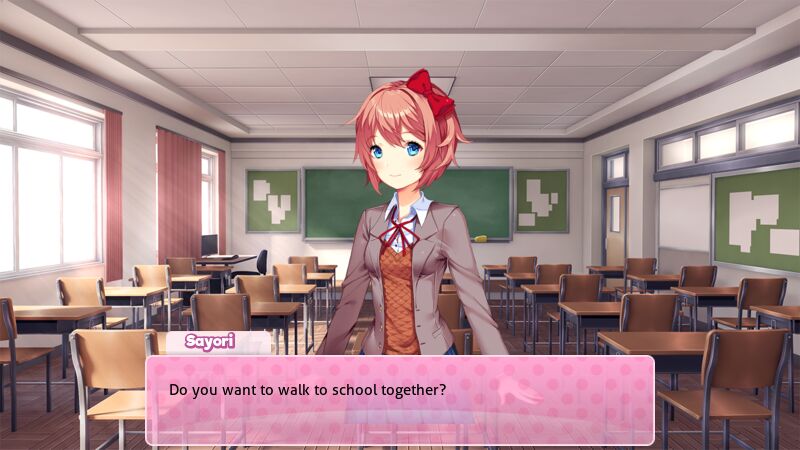
DDLC text box of Sayori saying "Do you want to walk to school together?", made with the Doki Doki Dialog Generator
Sayori — one background, one expression, one line.

Writing lines that sound like Sayori

The text box fits three lines, and short lines read better at thumbnail size — something like "Do you want to walk to school together?" is about the right length.

The line counter above the input tells you when you're about to overflow, so nothing gets silently cut off when you export.

Put her in a scene with someone else

Tap "Add character" in the Character tab to put more people beside Sayori — another club member, the protagonist, whoever — then snap them left / center / right, or use the sliders to move and resize each one.

Why this one

Built for phones

Every control is thumb-sized. No desktop needed, no pinch-zooming.

Story & wide export

9:16 for TikTok and IG stories, 16:9 for everywhere else.

Every character

The four club members plus two versions of MC, FeMC and Amy — every expression, and each one can be moved, scaled and flipped.

FAQ

How many Sayori expressions are there?

29, all taken from the game sprites. They appear as thumbnails in the Expression tab.

Can I move or resize Sayori?

Yes. Snap Sayori left, center or right, or use the sliders to move, scale and flip freely — a zoomed-in close-up in front of another character works too, since layer order is adjustable.

Can I use the image in my own comic or video?

It's fan work built from Team Salvato's artwork — fine for non-commercial fan content, the same as any other DDLC fan art. Don't sell it.

Is this the official DDLC tool?

No. This is a free fan-made tool with no affiliation to Team Salvato. All characters and artwork belong to them.

Do I need to install anything?

No. It runs in your phone browser, there is no sign-up and nothing to download.

Explore

Doki Doki Dialog GeneratorTwo-character dialogue scenesMonika text box generatorNatsuki text box generatorYuri text box generator
Suggest a feature